Blink Beauty Cam: Photo Makeup
- 4.4
- Rating
- 1.00M
- Installs
- Free
- Price
 Analysis by App-foxy
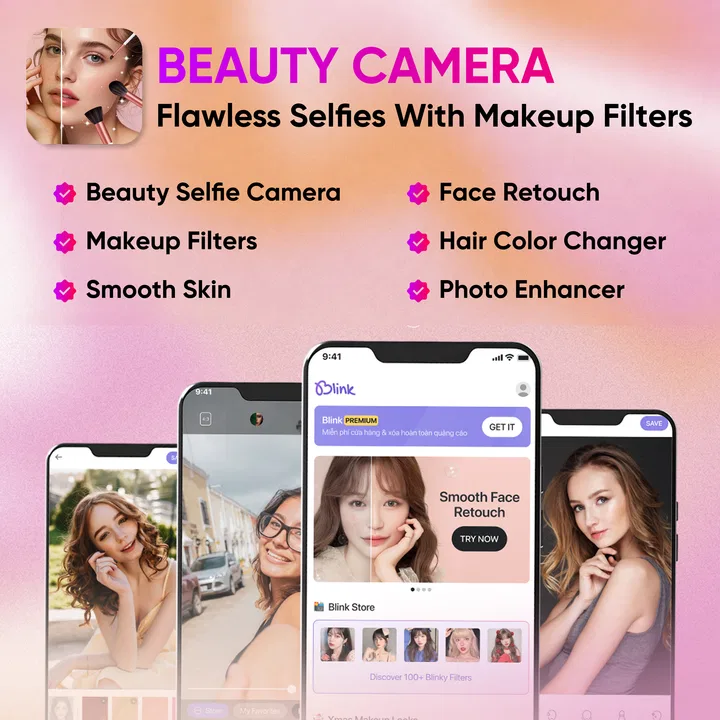
My first impression of Blink Beauty Cam: Photo Makeup was that it is built for quick visual changes rather than careful photo production. I could open it, take a selfie, try a different look, and decide within moments whether the result suited me. That immediacy is the main reason this beauty app is appealing during the first few days. It does not ask me to learn a complicated editing workflow before I can see a difference.
The app comes from Flexim and sits in the beauty category, with a free starting point and optional purchases ranging from $0.99 to $16.99 per item. It is aimed at an Everyone audience, so its basic presentation is easy to approach. The central idea combines a camera for selfies, nature-themed visual treatment, photo filters, and face makeup editing. In practice, I found it most useful when I wanted a polished image for a profile, a casual post, or a private experiment without spending several minutes adjusting every detail manually.
Its first-week appeal is easy to understand. A normal front-camera photo can feel flat because of indoor lighting, a tired expression, or an unhelpful background. A beauty camera gives me a fast way to soften that impression. The important question, though, is whether the app remains useful after the novelty of trying every visible effect has passed. My experience is that it can earn a place in a regular photo routine, but only if I treat it as a quick finishing tool rather than a complete replacement for a more controlled editor.
You May Also Like

 Blood Strike: 2.5 Anniversary
Blood Strike’s Loadouts Turn Every Drop Into a Tactical Gamble
A close look at Blood Strike’s custom loadouts: how fast access to signature weapons reshapes its battle royale rhythm, rewards preparation, and narrows the gap between fights.

 Pandora - Music & Podcasts
Pandora’s Music Is Easy to Start, but Harder to Recover
Pandora’s strength is its low-effort path from a seed to a station. Its weak spot is how much confidence it asks you to place in connection, setup, and quiet recovery.

 8 Ball Pool
 Is Built on Rivalries, Rematches, and Routine
A close look at the rivalries, rematches, shared routines, and unanswered safety questions that turn a quick pool match into a persistent mobile community.

 Samsung Music
’s Quiet Strength Is Playing What You Already Own
Its reach comes less from spectacle than from dependable access to a personal library. That simplicity is both the app’s strongest retention engine and its ceiling.

 AccuWeather: Weather Radar
AccuWeather Review: A Quick, Clear Forecast for Everyday Decisions
For everyday plans, the best forecast is the one you can understand quickly. AccuWeather makes rain timing, radar, and local conditions easy to act on, with a few trade-offs.

 Hill Climb Racing
Why Hill Climb Racing Still Turns Crashes Into One More Run
A tiny car, a bumpy hill and one more upgrade: Hill Climb Racing keeps resurfacing because its simple chaos makes every near-miss feel personal.
More From Our News Desk



What the first week feels like
During the first sessions, I naturally focused on discovery. I tried the selfie camera, moved through filters, and compared makeup-style changes against the original image. That side-by-side habit matters because beauty effects can look attractive at first glance while becoming too obvious when I return to the unedited photo. I recommend taking a moment to compare before saving or sharing. A face that looks smooth on a small phone preview may lose natural texture when viewed larger.
The nature-oriented look gives the app a different mood from a basic portrait retoucher. Instead of treating every image as a formal headshot, it encourages a softer, more playful result. I found that especially suitable for outdoor photos, daylight portraits, and casual images where a gentle color change supports the setting. It is less convincing when I want a neutral business portrait or a faithful record of how a makeup product actually looks in real life.
A useful early workflow is to start with the original photo, choose the overall filter first, and only then adjust the face makeup effect. If I began with strong facial changes and added a dramatic filter afterward, the finished picture could feel overprocessed. Reversing that order helped me judge whether the face edits were still doing useful work. This is a small habit, but it prevents the common mistake of stacking effects simply because each one looks exciting on its own.
I also learned not to judge the app only by its most noticeable presets. The strongest visual treatment is not automatically the best one for a profile image or everyday post. Subtler changes tend to survive different screens and lighting conditions better. When the goal is to look refreshed rather than transformed, a restrained filter with limited makeup editing usually feels more believable.
Who gets the most from the quick camera
This app makes sense for someone who takes frequent selfies but does not want to open a full photo editor every time. It is also a reasonable choice for a person who enjoys experimenting with beauty styles before deciding what kind of image to share. The low entry cost makes that experimentation easy: I can begin without paying, then decide whether any optional item is genuinely useful to my routine.
It is less suitable for photographers who need precise control over exposure, color, skin texture, or selective retouching. It is also not my first choice when accuracy matters more than mood. For example, if I were documenting a new haircut, reviewing cosmetics, or preparing a professional portrait, I would prefer an editor that makes every adjustment easier to inspect and fine-tune.
People who dislike beauty filters should also be realistic about the app’s purpose. The camera and editing concept is centered on enhancement, not faithful reproduction. That does not make it bad; it simply means the right expectation is a polished interpretation of a selfie, not an untouched camera file.
A realistic everyday use
Imagine getting ready for a video call or meeting friends after work and noticing that the available light is dull. I would take one selfie in Blink Beauty Cam, test a mild filter, and use the makeup editor only to correct the parts that distract me. If the result still looks like me, I can save it for a profile update or send it to a friend. The whole process is more practical than opening a desktop-style editor, especially when I am making a decision on the move.
That scenario also shows the app’s limitation. It can improve the image, but it cannot fix poor composition, a distracting background, or genuinely bad lighting in the room. I still get better results by facing a window, cleaning the camera lens, and holding the phone at a comfortable angle before applying any effect. The app rewards a decent starting photo; it does not remove the need for one.
Whether it keeps earning space after the novelty
After the first month, the value of a beauty camera depends less on the number of filters I can try and more on whether it shortens a repeated task. For me, the strongest recurring use is preparing casual portraits quickly. If I already know which visual style suits me, I can move from capture to a shareable result without rebuilding an edit from the beginning.
The app’s current version is 2.0.4, and it supports devices running Android 7.0 or later. That broad compatibility makes it approachable for people who are not using a recent phone. At the same time, an older device may make any camera editor feel less comfortable if switching effects causes delays or if storage is limited. I would keep some free space available and avoid treating the app as a replacement for the phone’s normal camera when I need the fastest possible shutter response.
Its lasting value is strongest for users with a clear personal routine. I would choose one or two looks for everyday selfies, reserve more expressive treatments for occasional posts, and keep the original image whenever the photo might be useful later. This approach turns the app from a novelty shelf into a small part of a repeatable workflow. Without that discipline, the experience can become endless browsing through similar effects.
The free model is helpful for trying the core experience, but optional purchases deserve a little restraint. I would not buy an item simply because it appears attractive in a preview. First, I would ask whether it solves a recurring problem: does it give me a style I will actually use, or is it only interesting for one afternoon? A one-time experiment can be fun, but recurring value comes from a look that works across several kinds of photos.
That distinction is particularly important for people who already own another editing app. If a general editor already handles filters and portrait adjustments well, Blink Beauty Cam needs to be faster or more enjoyable to justify staying installed. Its advantage is convenience and a beauty-focused presentation, not necessarily deeper control. I would keep both only if this app consistently gets me to a finished selfie sooner.
The maintenance burden is small, but not zero
Maintaining a useful photo routine involves more than installing the app. I found that the biggest task was remembering to compare edits with the original rather than accepting the first attractive preview. A quick review prevents a filter from overpowering the face and helps me avoid saving several nearly identical versions of the same image.
File organization can also become a quiet source of work. If I save every variation, my gallery fills with duplicates that are difficult to distinguish later. My preferred method is to keep the original, save only the strongest edited version, and delete experiments once I have made a decision. This is not a feature of the app itself, but it makes the app much easier to live with over time.
I would also create a personal limit for editing intensity. For everyday images, I might use a light touch; for a themed post, I can be more adventurous. Having that rule reduces the temptation to keep adjusting a photo long after the useful work is finished. It also makes my images look more consistent if I use the app several times in a month.
Another practical point is that a filter cannot compensate for every lighting situation. I get more dependable results when I take the photo in even light and avoid placing a bright window directly behind me. If the initial image has harsh shadows, the makeup effect may draw more attention to the face instead of making it look naturally refreshed. Good capture habits reduce the amount of correction I need later.
Where fatigue starts to appear
The first source of fatigue is repetition. Once I have found a few effects that suit me, browsing through many alternatives can feel less like creativity and more like searching for a small variation of the same result. The app is most enjoyable when I have a specific purpose, such as preparing a new profile photo or giving an outdoor selfie a different mood. It is less satisfying when I open it without knowing what I want to make.
The second is the gap between a flattering preview and a believable final image. Beauty editing is subjective, and the same treatment can look polished in one photo but artificial in another. Different skin tones, expressions, hair colors, and backgrounds affect the result. I would not assume that a favorite setting is universal. It is worth checking each image on its own instead of applying a familiar look automatically.
A third issue is the temptation to use the app for confidence rather than editing. There is nothing wrong with enjoying a stylized selfie, but relying on heavy changes for every image can make ordinary photos feel inadequate by comparison. I prefer using the app as a creative option, not as a requirement before I can share a picture. That mindset keeps the experience enjoyable and prevents the maintenance routine from becoming a chore.
There is also a practical trade-off between speed and control. A focused beauty camera can get me to a pleasant result quickly, while a full editor offers more room to correct individual details. If I need to match the color of clothing, repair a complex background, or make a carefully balanced portrait, I would switch tools. Blink Beauty Cam is better when the decision is “make this selfie feel nicer” than “perform a complete image retouch.”
How it compares with familiar alternatives
Compared with the standard phone camera, this app offers a more immediate beauty-oriented path from capture to edited selfie. The phone camera remains better when I want the cleanest original image, maximum flexibility later, or the quickest way to capture an unexpected moment. I would use the normal camera for important photos and Blink Beauty Cam when I already know I want a styled result.
Compared with a general photo editor, it feels more approachable for face-focused work. A general editor may provide stronger control over cropping, lighting, layers, and detailed corrections, but that flexibility can slow down a simple selfie. Blink Beauty Cam is the more convenient option when I want to make a few appearance and mood changes without constructing the edit manually.
Compared with social media camera tools, its appeal is that I can think about the image before posting it. That separation gives me a chance to compare the original and edited versions and decide whether the result still feels appropriate. On the other hand, someone who wants to record and publish immediately may prefer the camera already built into their social platform.
The app has attracted over a million installs and holds a 4.4 average from around thirteen thousand ratings, which suggests that the quick beauty-camera idea has found a substantial audience. Those figures do not decide whether it belongs on my phone, but they do fit my experience: the concept is easy to understand and immediately usable. I would still judge it by my own editing habits rather than by popularity alone.
My long-term verdict on keeping it installed
After using Blink Beauty Cam: Photo Makeup as a practical selfie tool rather than a collection of effects to exhaust, I see a clear reason to keep it. Its lasting strength is the short path from an ordinary selfie to a presentable, mood-driven portrait. That is valuable when I want a result now and do not need the detailed control of a professional editor.
I would recommend it to casual selfie users, people who enjoy experimenting with makeup-style edits, and anyone who wants a free way to test a beauty camera before considering optional purchases. The Everyone rating and support for Android 7.0 or later also make it a straightforward option for a wide range of Android users. Flexim has kept the idea focused enough that I can understand the app’s purpose without a long learning period.
I would skip it if my priority is natural documentation, advanced retouching, or a single editor for every kind of photography. I would also avoid paying for several optional items before establishing a routine. The free entry point is enough to discover whether the camera style fits me; spending should come only after I know I will return to a particular look.
My final recommendation is conditional but positive: keep it if it saves time in a real photo habit, not merely because the first session is entertaining. Use a decent original photo, apply the filter before fine makeup adjustments, compare the result with the unedited image, and save only the version you genuinely prefer. With those limits, the app can remain useful after the initial excitement fades. Without them, it risks becoming another folder of forgotten effects and duplicate selfies.
For me, that balance is enough to make it worth trying. It is not a complete photography studio, and it does not need to be. As a focused beauty camera, it works best when I want a quick, expressive portrait and understand where convenience should give way to control. That makes it a practical occasional companion rather than an essential camera replacement.
FAQs for Blink Beauty Cam: Photo Makeup
01What features does Blink Beauty Cam: Photo Makeup offer for photo editing?
Blink Beauty Cam offers a wide range of features for photo editing, including makeup application, skin smoothing, blemish removal, and virtual hairstyles. Users can also adjust lighting and apply various filters to enhance their photos. The app provides easy-to-use tools that cater to both beginners and advanced users.
02Is Blink Beauty Cam available for both Android and iOS devices?
Yes, Blink Beauty Cam is available for download on both Android and iOS platforms. Users can find the app on the Google Play Store for Android devices and the Apple App Store for iOS devices. Ensure your device meets the app's compatibility requirements for optimal performance.
03Does Blink Beauty Cam require an internet connection to function?
While many features of Blink Beauty Cam can be used offline, certain functionalities, such as accessing new filters and updates, may require an internet connection. Additionally, sharing edited photos directly from the app to social media platforms will also need an active internet connection.
04Are there in-app purchases or subscriptions within Blink Beauty Cam?
Blink Beauty Cam offers a variety of free features for basic editing. However, there are in-app purchases available for premium features, such as exclusive makeup styles and advanced editing tools. Users can opt for a subscription to access all premium features without limitations.
05How user-friendly is Blink Beauty Cam for beginners?
Blink Beauty Cam is designed to be highly user-friendly, with an intuitive interface that guides users through the editing process. The app includes tutorials and tips for beginners, making it easy to learn how to apply makeup and edit photos effectively, even with no prior experience.
Pros
- User-friendly interface for quick edits.
- Wide range of makeup filters available.
- Real-time preview of makeup effects.
- High-quality photo output.
- Includes fun and trendy stickers.
Cons
- Contains in-app purchases for full features.
- Some filters may look unrealistic.
- Occasional ads interrupt editing.
- Limited free effects for new users.
- Requires internet connection for updates.

Blink Beauty Cam: Photo Makeup
Gallery